html中的虚拟列表

一个用 Vue 写的 10 万条数据下依旧柔顺丝滑的虚拟列表组件.

本文旨在帮助虚拟列表的学习理解, 并不实际使用. 试了几种虚拟 Dom 方案, 记录一种效果最好的. 下面是效果图.

本文只为方便理解, 不会贴出完整代码, 建议跟随源码阅读.

其中 ./src/views/VirtualList为固定高度的虚拟列表, ./src/views/InfiniteView/目录下为不固定高度的虚拟列表.

减少 js 操作

10 万条数据我们当然不能真的创建 10 万个 DOM 对象来展示数据. 而是随着页面滚动动态的给一定数量的 dom 重新赋值.过程中不可避免就得进行大量的 js 数据操作. 监听滚动行为, 并且刷新显示数据. 为了尽可能的让滚动看上去顺滑, 首先要尽可能减少对大量数据的操作频率.
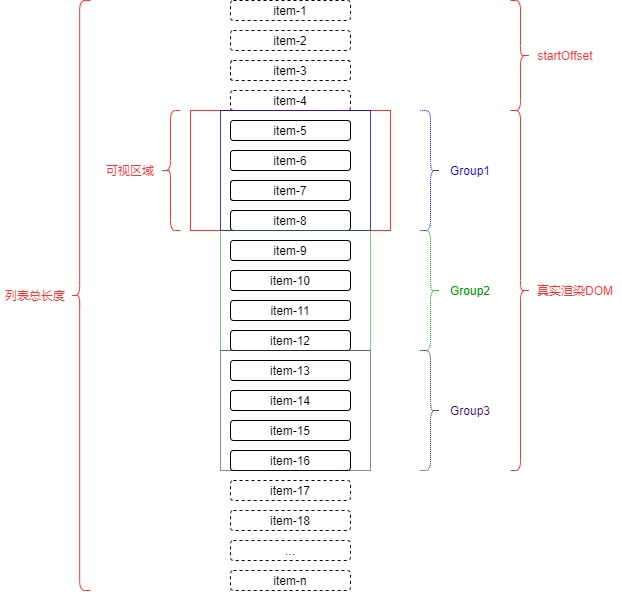
将显示的 DOM 分成 3 部分group1,group2, group3.

数据量大时, 始终保持有 3 个 Group 每个 group 的高度大约为可视区域的高度

只有当滚动触发到 group 边界时, 才会触发数据的重新赋值. 这样可以大大减少了数据更新的频率, 减少 js 的计算

我们用cacheWrappers数组来存储和管理相应的group源数据, 形如`[group1, group2, group3]

滚动条及滚动

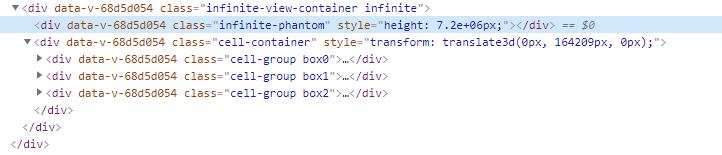
整个列表的 dom 结构如图dom结构
页面渲染的过程中我们会缓存下所有 item 的坐标信息并缓存到数组caches中.

在页面初始化时, 先渲染出 3 个可视区域高度的数据, 然后根据caches的数量和高度动态计算出预估高度estimateHeight.

用一个绝对定位div.infinite-phantom撑起整个容器, 并根据数据源的长度List.length * estimateHeight来预估整个列表的总长度totalHeight. 随着数据渲染量的增多estimateHeight会越来越趋于 item 的平均值, 而totalHeight也会越来越趋于准确值.

我们用div.cell-container来包裹整个数据展现的 Dom. 在列表滚动的同时利用transform: translate3d(0px, startOffset, 0px)动态更新cell-container的位置, 从而让数据可以始终在屏幕中展示.

缓存

item 第一次渲染时, 我们将获取到 item 的高度和 top 值缓存起来

1
2
3
4
5
6
7
class Cache {
constructor({ top = 0, height = 0 }) {
this.top = top;
this.height = height;
}
}
export default Cache;

CacheManager是专门用来管理Cache的工具类. 为了高效读取数据, 缓存一共分为 2 部分.

caches: 存放 item 位置和高度的缓存数组, 形如 [cache, cache, cache]

cacheObj: 为了快速读取cache, 不用每次都遍历数组建的 Object, 形如: {_infiniteId: cache}

初始渲染

为了获取更可信的estimateHeight值, 页面初始化时我们用startLoad方法强行往 3 个group中添加了 3 组刚好渲染够屏幕高度的数据.并且将他们的高度缓存到caches中.

1
2
3
4
5
6
7
8
9
10
11
12
13
14
15
16
17
18
19
20
21
22
23
24
25
26
27
28
29
30
31
32
33
34
35
36
37
38
39
40
41
// 预加载列表 直到加载到超出屏幕的尺寸
firstLoad(start = 0, idx) {
let loadList = this.myList.slice(start, start + 2)
// 更新数组
let target = this.cacheWrappers[idx] || []
target = target.concat(loadList)
this.$set(this.cacheWrappers, idx, target)
this.$nextTick().then(() => {
// 去更新cache
let lastCache = this.C.lastCache
let cellDoms = this.$refs.container.children[idx].children
const startIdx = target.length - loadList.length
/*************************** 缓存到caches中的操作 *********************************/
loadList.forEach((item, index) => {
if (!this.C.getCache(item._infiniteId)) {
let cache = new Cache({
top: lastCache ? lastCache.top + lastCache.height : 0,
height: cellDoms[startIdx + index]
? cellDoms[startIdx + index].offsetHeight
: this.C.estimateHeight,
})
this.C.setCache(item._infiniteId, cache)
lastCache = cache
}
})
/************************************* end ************************************/
// 如果高度未超出屏幕就继续渲染
if (
this.$refs.container.children[idx].offsetHeight <
this.$refs.wrapper.offsetHeight
) {
this.firstLoad(start + 2, idx).then(() => {
resolve()
return
})
} else {
resolve()
return
}
})
}

我们通过CacheManager提供一个 getter 方法来获取estimateHeight. 取最后一个Cache的 top 和 height 再除以caches的长度.

1
2
3
4
5
6
7
8
get estimateHeight() {
const lastCache = this.lastCache
if (!lastCache) {
return 50
} else {
return Math.ceil((lastCache.top + lastCache.height) / this.caches.length)
}
}

监听滚动

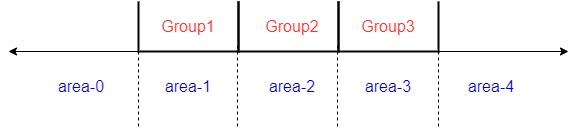
我们给 3 个group的区域的前后划分区域, 如图所示

滚动区域

当页面滚动过程中, 我们通过触发不同的位置来新增和删除Group, 动态保持平衡

页面向上滚动, 只要scrollTop在area-1区域内, 那么就删除Group3, 添加Group0

页面向下滚动, 只要scrollTop抵达area-2区域, 那么就删除Group1, 并添加Group4

如何判断区域

我们用sections数组来存储几个 area 的边界值, 形如[0, 750, 1500, 2400], 每次Group有更新时就去更新sections数组.

1
2
3
4
5
6
7
8
9
10
11
12
13
14
15
16
17
18
// 更新界定范围
updateSection() {
const cacheWrappers = this.cacheWrappers
let sections = []
let cache
cacheWrappers.forEach((value, index) => {
if (value.length > 0) {
cache = this.C.getCache(value[0]._infiniteId)
sections.push(cache.top)
if (index === cacheWrappers.length - 1) {
cache = this.C.getCache(value[value.length - 1]._infiniteId)
sections.push(cache.top + cache.height)
}
}
})
this.sections = sections
...
}

页面滚动时, 通过 scrollTop 来判断在sections的哪个区间内, 从而获取到当前在哪个area下.

1
2
3
4
5
6
7
8
9
10
11
12
13
14
// 判断在第几区域
getSectionArea(scrollTop) {
const sections = JSON.parse(JSON.stringify(this.sections))
let area = 0
let section = sections.shift()
while (section !== undefined) {
if (scrollTop < section) {
break
}
area++
section = sections.shift()
}
return area
}

问题

目前其实还有个遗留问题. 因为用 Vue 写的, 数组变化的时候, 图片会重新渲染. 也就造成了滚动过程中, 图片会偶尔闪动. 以后找到解决方案再来补充